Showing posts with label Mac OS X. Show all posts

Sunday, 4 March 2012

README first

News - From June 2010, I started to spend money on Google AdWords to maximise my effort to share experiences by writing this blog.

Welcome to my blog on CFD, numerical modelling and parallel programming. Though relevant things are included, the CFD part of this blog focuses on the packages SALOME, Code_Saturne and ParaView etc. The complete content can be directed by the Labels list on the right side.


All the posts here are kept updated. Following or subscribing a blog is a good idea if it really helps. Up to March 2012, as reported by Google, there are 90 friends who are following or subscribing my posts using Google.

The most popular posts are summarised as follows

1. Installation of SALOME on Ubuntu

The latest SALOME version is 6.3.1. However I haven't tried this version; I am still using the 5.1.x.

For 5.1.x the latest version is 5.1.6. The complete instruction, "Installation of SALOME 5.1.3 on Ubuntu 10.04 (64 bit)", should help when install SALOME 5.1.x onto Ubuntu; at least according to feedbacks, this works up to 5.1.4 onto Ubuntu 10.04 (32/64 bit). The tips also suit Ubuntu 9.10, if all packages are updated in the system.

For Ubuntu 9.10, an older post is "Installation of SALOME 5.1.2 on (K)Ubuntu 9.10 64 bit". The notes might be slightly outdated.

If preferring Ubuntu 9.04, it is also easy to install SALOME by only following "Installation of SALOME 5.1.1 on Ubuntu 9.04". The post actually helps up to the latest version 5.1.3.

For those who still use the old 4.* versions of SALOME, "Polishing GUI of older SALOME versions" is recommended to read.

2. SALOME tutorials

"CFD tutorial: laminar flow along a 2D channel - Part I" is a brief tutorial on using SALOME to do the geometry modelling and meshing.

More examples are still on the way.

3. Installation of Code_Saturne on Ubuntu

The latest Code_Saturne 2.1.0 is much easier to compile and install than ever. An instruction on this version is on the way. By the way I also successfully ported this version onto Windows 7.

Since version 2.0 Code_Saturne started to adopt the typical source build and install procedure on Linux. By following "Installation of Code_Saturne 2.0-rc1 on Ubuntu 10.04 (64 bit)" I am confident it would be an easy job for you. In the meantime, if you are also a SALOME user, I strongly recommend you to read "Compile Code_Saturne with SALOME binary libraries" in order to reuse the binary libraries already shipped with SALOME.

Two slightly outdated but helpful posts are "Installation of Code_Saturne 2.0.0 on Ubuntu 9.04" and "Installation of Code_Saturne 2.0-rc1 on Ubuntu 9.10".

You can also try to test installing Code_Saturne with apt-get. Please read "apt-get, the ideal way to install the software onto Ubuntu".

The instruction on installation of the last stable version, 1.3.3, was written in "Installation of Code_Saturne 1.3.3 on Ubuntu 9.04". On the other hand, for the version 1.4.0 the installation procedure is quite similar to that of 1.3.3, except 1.4.0 turned to use PyQt4 and Qt4. Please check "Installation of Code_Saturne 1.4.0 on Ubuntu 9.04" to see how to use (Py)Qt4 instead of the python-tk and tix.

4. Code_Saturne tutorials

"CFD tutorial: laminar flow along a 2D channel - Part II" gives a brief tutorial on how to apply Code_Saturne to solve a CFD problem.

More examples are still on the way.

5. Installation and usage of ParaView

Installation of ParaView is relatively easier and please read "Installation of ParaView 3.6.1 on Ubuntu 9.04". The usage of ParaView is briefly illustrated by an example in the article "Post-processing with ParaView".

For the latest version of ParaView, please refer to its official site.

6. GPGPU acceleration with CUDA techniques

A basic idea of using NVIDIA CUDA and the template library thrust is shown in "A simple test on the efficiency of thrust". An example to use CUDA practically is "Apply CUDA to solve a 1D heat transfer problem".

Last but not least, any comments are sincerely welcome and your support is always my motivation. The visitors here are from all over the world. See the visits map overlay below, which is provided by Google Analytics for the half-a-year period from January 2010.

Friday, 28 October 2011

ParaView 3.12.0 RC-3 available for download

ParaView 3.12.0 Release Candidate 3 binaries are available for download on the official page http://paraview.org/paraview/resources/software.html. It is a bug-fix release and the details can be found at http://www.paraview.org/Bug/changelog_page.php?version_id=85.

Thursday, 25 August 2011

I am looking for a job

News - I greatly appreciate your comments below and surprisingly plenty of information and valuable advices came to me during the last one year. Thanks to all your concern, I finally accepted a thermal expert position in ABB USA (www.abb.com) and am sitting in North Carolina.

I particularly thank the three companies in England, France and America that I personally consulted for and their encouraging recommendations. I cherish the experiences I have obtained from the part-time working with them.

Within my PhD study, I have published eight research papers. Four of them are in leading journals and their links are as follows:

I am graduating in September 2011 with a PhD degree from School of Electrical and Electronic Engineering, University of Manchester. I am looking for a numerical modelling job.

I spent the past more than three years on the CFD simulations which are coupling between electric, thermal and fluid dynamic fields, from which I have accumulated rich experiences on modelling packages such as SALOME, Code_Saturne, Elmer, ParaView and COMSOL etc. I share experiences in this blog, which has also gained worldwide popularity.

I have been programming in C/C++, C#, VB.NET and Matlab since 2002. I also have experiences in Python (the script widely used for automation of modelling and the software such as SALOME and ParaView etc) and Fortran (the user routine definition for Code_Saturne) etc. Meanwhile, probably as a bonus, I am a fan of open-source software, Linux and Mac OS X. I even wrote device drivers for Linux and ported the MySQL client tool running on desktops onto embedded Linux platforms.

I bear high interests in numerical modelling and would like to pursue a career in this field. If you have relevant opportunities, please drop me an email (salad00 at gmail dot com). I really appreciate your help very much.

Sunday, 21 August 2011

CUDA HeatTransfer1D program on Mac OS X

I recently ported the CUDA program for 1D heat transfer onto Mac OS X 10.6.8 and CUDA 4.0.31. I only modified the parts related to timing and the program could work perfectly.

The hardware platform comprises GeForce 320M, 950 MHz, and Intel Core 2 Duo P8600, 2.40 GHz. The computation times for GPU and CPU are 1.86 s and 2.15 s respectively; speedup of 1.16. Previously on Windows 7 and CUDA 3.1, GeForce 9800 GTX+ and Q6600 used calculation times 1.43 s and 5.04 s respectively.

The source code is attached for comments.

Thursday, 23 June 2011

New software updates including OpenFOAM

Recently there have been some interesting software updates including

1. OpenFOAM version 2.0.0

OpenCFD released OpenFOAM version 2.0.0 and many significant developments have been made. In parallel to the release of OpenFOAM 2.0.0, the git repository was updated to 2.0.x.

2. GeekoCFD 2

GeekoCFD 2 has been released.

3. VMware Fusion 3.1.3

VMware Fusion 3.1.3 (416484) has been release at the end of May. Bugs were fixed and more importantly, Ubuntu 11.04 has been officially supported. The previous version needed patches for its VMware tool because of its incompatibility to Linux Kernel 2.6.37/38.

4. Firefox 5

Mozilla greatly shortened its new version release periods. As a convention Microsoft IE team sent Mozilla a cupcake for launching Firefox 5.


Firefox has been updated automatically to this latest version on my Mac and all extensions work very well. On Windows there is only one exception, IE Tab Plus.

Sunday, 13 March 2011

Share some helpful articles

1. Installation of Code_Saturne on Mandriva

A very helpful wiki page on how to compile and install Code_Saturne onto Mandriva has been contributed as follows

http://wiki.mandriva.com/fr/index.php?title=Code_Saturne

Since it is a French instruction, I also paste the Google translated English version here, as

The Google translated English version

2. A practical Code_Saturne study example

It is interesting to read a CFD example which combines the usage of SALOME, Code_Saturne and ParaView.

http://www.caelinux.org/wiki/index.php/Contrib:Claws/Real_world_study_CodeSaturne

3. Installing OpenFOAM 1.7.x on openSUSE 11.4

For those who want to install OpenFOAM onto openSUSE, probably this article is interesting.

Installing OpenFOAM 1.7.x on openSUSE 11.4

4. Compiling OpenFOAM 1.7.x on Mac OS X Snow Leopard

For those who want to use OpenFOAM on Mac OS X, the article could be helpful.

Compiling OpenFOAM 1.7.x for OS X 10.6

I hope these articles help you.

Wednesday, 9 March 2011

ParaView 3.10.0 is released

The ParaView team has announced the availability of the ParaView 3.10.0 final binaries for download on the ParaView download page.

http://paraview.org/paraview/resources/software.html

I repost the Release Notes from the email list as follows:

ParaView 3.10

This release features notable developments, including mechanisms to incorporate advanced rendering techniques, improved support for readers and several usability enhancements and bug fixes.

For the 3.10 release, we have added 60 new readers. The new readers include: ANSYS, CGNS, Chombo, Dyna3D, Enzo, Mili, Miranda, Nastran, Pixie, Samrai, Silo, and Tecplot Binary. A full listing of supported readers can be found in the ParaView Users Guide. We also added the ability for developers to create ParaView reader plugins from previously developed VisIt reader plugins. You can find a full guide on how to do this on the VisIt Database Bridge: http://www.paraview.org/Wiki/VisIt_Database_Bridge.

With this release we have rewritten the ParaView User's Guide and are making it freely available for the first time. The complete guide can be obtained in the help system or online at:
http://paraview.org/Wiki/ParaView/Users_Guide/Table_Of_Contents.

We have included a Python-based calculator which makes it possible to write operations using Python. The Python calculator uses NumPy, which lets you use advanced functions such as gradients, curls, and divergence easily in expressions. Also the NumPy module is packaged in the ParaView binary and is importable from the ParaView Python shell.

There should also be a marked performance improvement for users dealing with large multi-block datasets. We have cleaned up the rendering pipeline to better handle composite datasets, avoiding the appending of all blocks into a single dataset as was done previously.

To better utilize multiple cores on modern multi-core machines, by default ParaView can now run using a parallel server, even for the built-in mode. This enables the use of all the cores for parallel data processing, without requiring the user to start a parallel server. ParaView binaries will also be distributed using an MPI implementation, making this feature available to users by simply downloading the binaries. Since this is an experimental feature, it is off by default, but users can turn it on by checking the Auto-MPI checkbox in the application settings dialog.

Additionally, the 3.10 release includes several usability enhancements. 3D View now supports smart context menus, accessed by right-clicking on any object in the 3D View to change its color, representation, color map and visibility. Left-clicking on an object in the 3D View makes it active in the pipeline browser. Within the spreadsheet view, sorting is now supported and an advanced parallel sorting algorithm ensures that none of the benefits of the spreadsheet view, such as streaming and selection, are sacrificed. Python tracing and macro controls are no longer hidden on the Python shell dialog and instead are now easily found on the Tools menu.

For developers interested in adding support for advanced multi-pass rendering algorithms to ParaView, this release includes a major refactoring of ParaView's rendering pipeline. View and representations have been redesigned and users should see improved performance in client-server mode from reduced interprocess communication during rendering.

LANL's MantaView interactive ray tracing plugin has been restructured to make it easier to use. Version 2.0 of the plugin is now multi-view capable and no longer requires ParaView to be run in a client/server configuration. Similarly both of LANL's streaming aware ParaView derived applications have been merged into ParaView proper in the form of a new View plugin. The underlying streaming algorithms have been rewritten to be more usable and extensible. Both plugins are available in standard binary package for the first time in this release.

For an exhaustive list of the new features and bug-fixes, please refer to the change log at: http://www.paraview.org/Bug/changelog_page.php.

As always, we rely on your feedback to make ParaView better. Please use http://paraview.uservoice.com/ or click on the "Tell us what you think" link on paraview.org to leave your feedback and vote for new features.

Monday, 7 December 2009

SALOME, on the way to cross-platform

SALOME running on Mac OS X

Unfortunately, I don't have a Mac machine and thus I didn't get any experience on a Mac, because of its big price :(. However, I do suggest you read here if you want to use SALOME on Mac OS X. There is also a nice picture which might bring some hope if you are facing problems.


SALOME version 5.1.2 for Windows platform

Although I knew SALOME was ported onto Windows platform, I didn't try, because regarding such a huge and complicated software package, I don't expect more. However, I also admit that if the Windows version can run well, it is significantly helpful to those who are not familiar with Linux enough. Then I tried this Windows version and, surprisingly, found it works like a charm. Python, C/C++, QT and all of the cross-platform languages and libraries do give us an option to create programs which is compatible with both Linux and Windows simultaneously. It is totally awesome.

Ok, let's look at this SALOME for Windows. From

http://files.salome-platform.org/cea/adam/salomewindows/download/

the zip package (and a patch file) can be downloaded. Unpack the package to wherever you like, run the bat file release\salome.bat, and SALOME will be launched. Its appearance is exactly the same as in Linux. I tried to load a python script I previously wrote. It worked very well.

The patch file salome_utils.py should be copied to the directory release\modules\KERNEL_INSTALL\bin\salome.

Do you want a go?

SALOME version 5.1.3 for tests on Windows

SALOME version 5.1.3 is recently released by CEA/DEN, EDF R&D and OPEN CASCADE on 14th Dec. 2009. As mentioned, it is a public maintenance release that contains planned major and minor improvements plus bug fixes against SALOME version 5.1.2. Read the news for more details and the download page is here.

According to the message published on the SALOME forum, A SALOME 5.1.3 for tests on Windows came to be available on 18th Dec. 2009. The download address is still at http://files.salome-platform.org/cea/adam/salomewindows/download/. The previous version 5.1.2 was moved to the directory "old". Addtionally, a list of known problems can be found at http://sites.google.com/site/wikisalomeplatform/Home/salome-windows/salome-windows-errata.

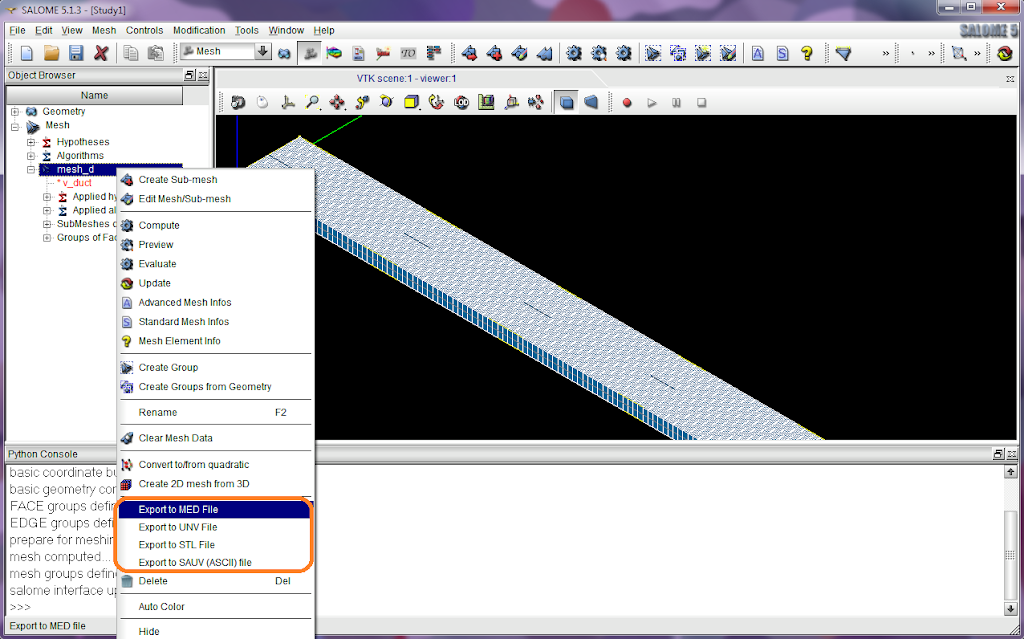
Probably, for those who are looking forward to using SALOME on Windows, screenshots could bring more pleasant surprises. The screenshots below were taken from Windows 7.


You can also compile SALOME on windows if you like. See a howto at http://sites.google.com/site/wikisalomeplatform/Home/salome-windows/5-1-3/howto-compile.