Showing posts with label GPGPU. Show all posts

Sunday, 4 March 2012

README first

News - From June 2010, I started to spend money on Google AdWords to maximise my effort to share experiences by writing this blog.

Welcome to my blog on CFD, numerical modelling and parallel programming. Though relevant things are included, the CFD part of this blog focuses on the packages SALOME, Code_Saturne and ParaView etc. The complete content can be directed by the Labels list on the right side.


All the posts here are kept updated. Following or subscribing a blog is a good idea if it really helps. Up to March 2012, as reported by Google, there are 90 friends who are following or subscribing my posts using Google.

The most popular posts are summarised as follows

1. Installation of SALOME on Ubuntu

The latest SALOME version is 6.3.1. However I haven't tried this version; I am still using the 5.1.x.

For 5.1.x the latest version is 5.1.6. The complete instruction, "Installation of SALOME 5.1.3 on Ubuntu 10.04 (64 bit)", should help when install SALOME 5.1.x onto Ubuntu; at least according to feedbacks, this works up to 5.1.4 onto Ubuntu 10.04 (32/64 bit). The tips also suit Ubuntu 9.10, if all packages are updated in the system.

For Ubuntu 9.10, an older post is "Installation of SALOME 5.1.2 on (K)Ubuntu 9.10 64 bit". The notes might be slightly outdated.

If preferring Ubuntu 9.04, it is also easy to install SALOME by only following "Installation of SALOME 5.1.1 on Ubuntu 9.04". The post actually helps up to the latest version 5.1.3.

For those who still use the old 4.* versions of SALOME, "Polishing GUI of older SALOME versions" is recommended to read.

2. SALOME tutorials

"CFD tutorial: laminar flow along a 2D channel - Part I" is a brief tutorial on using SALOME to do the geometry modelling and meshing.

More examples are still on the way.

3. Installation of Code_Saturne on Ubuntu

The latest Code_Saturne 2.1.0 is much easier to compile and install than ever. An instruction on this version is on the way. By the way I also successfully ported this version onto Windows 7.

Since version 2.0 Code_Saturne started to adopt the typical source build and install procedure on Linux. By following "Installation of Code_Saturne 2.0-rc1 on Ubuntu 10.04 (64 bit)" I am confident it would be an easy job for you. In the meantime, if you are also a SALOME user, I strongly recommend you to read "Compile Code_Saturne with SALOME binary libraries" in order to reuse the binary libraries already shipped with SALOME.

Two slightly outdated but helpful posts are "Installation of Code_Saturne 2.0.0 on Ubuntu 9.04" and "Installation of Code_Saturne 2.0-rc1 on Ubuntu 9.10".

You can also try to test installing Code_Saturne with apt-get. Please read "apt-get, the ideal way to install the software onto Ubuntu".

The instruction on installation of the last stable version, 1.3.3, was written in "Installation of Code_Saturne 1.3.3 on Ubuntu 9.04". On the other hand, for the version 1.4.0 the installation procedure is quite similar to that of 1.3.3, except 1.4.0 turned to use PyQt4 and Qt4. Please check "Installation of Code_Saturne 1.4.0 on Ubuntu 9.04" to see how to use (Py)Qt4 instead of the python-tk and tix.

4. Code_Saturne tutorials

"CFD tutorial: laminar flow along a 2D channel - Part II" gives a brief tutorial on how to apply Code_Saturne to solve a CFD problem.

More examples are still on the way.

5. Installation and usage of ParaView

Installation of ParaView is relatively easier and please read "Installation of ParaView 3.6.1 on Ubuntu 9.04". The usage of ParaView is briefly illustrated by an example in the article "Post-processing with ParaView".

For the latest version of ParaView, please refer to its official site.

6. GPGPU acceleration with CUDA techniques

A basic idea of using NVIDIA CUDA and the template library thrust is shown in "A simple test on the efficiency of thrust". An example to use CUDA practically is "Apply CUDA to solve a 1D heat transfer problem".

Last but not least, any comments are sincerely welcome and your support is always my motivation. The visitors here are from all over the world. See the visits map overlay below, which is provided by Google Analytics for the half-a-year period from January 2010.

Wednesday, 14 December 2011

Ten Ways to Fool the Masses When Giving Performance Results on GPUs

It might be interesting to review this article at HPCwire:

Ten Ways to Fool the Masses When Giving Performance Results on GPUs

and another two

Reviewing a paper that uses GPUs

How to write a 'GPUs are awesome' paper

NVIDIA Opens Up CUDA Platform by Releasing Compiler Source Code

NVIDIA today announced that it will provide the source code for the new NVIDIA® CUDA® LLVM-based compiler to academic researchers and software-tool vendors, enabling them to more easily add GPU support for more programming languages and support CUDA applications on alternative processor architectures.

"Opening up the CUDA platform is a significant step," said Sudhakar Yalamanchili, professor at Georgia Institute of Technology and lead of the Ocelot project, which maps software written in CUDA C to different processor architectures. "The future of computing is heterogeneous, and the CUDA programming model provides a powerful way to maximize performance on many different types of processors, including AMD GPUs and Intel x86 CPUs."

The full article is at

NVIDIA Opens Up CUDA Platform by Releasing Compiler Source Code

Otherwise refer to the article at HPCwire:

NVIDIA Opens Up CUDA Compiler

Sunday, 21 August 2011

CUDA HeatTransfer1D program on Mac OS X

I recently ported the CUDA program for 1D heat transfer onto Mac OS X 10.6.8 and CUDA 4.0.31. I only modified the parts related to timing and the program could work perfectly.

The hardware platform comprises GeForce 320M, 950 MHz, and Intel Core 2 Duo P8600, 2.40 GHz. The computation times for GPU and CPU are 1.86 s and 2.15 s respectively; speedup of 1.16. Previously on Windows 7 and CUDA 3.1, GeForce 9800 GTX+ and Q6600 used calculation times 1.43 s and 5.04 s respectively.

The source code is attached for comments.

Sunday, 26 June 2011

HPCwire interview with NVIDIA's David Kirk

Dr David Kirk is Nvidia's Chief Scientist. Here is an interesting interview with David Kirk on CUDA and parallel computing etc,

GPU Challenges: A Q&A with NVIDIA's David Kirk

Tuesday, 21 September 2010

MATLAB 2010b supports NVIDIA CUDA-capable GPUs

From MATLAB 2010b, GPU support is available in Parallel Computing Toolbox. Using MATLAB for GPU computing lets you take advantage of GPUs without low-level C or Fortran programming.

MATLAB CUDA support provides the base for GPU-accelerated MATLAB operations and lets integrate existing CUDA kernels into MATLAB applications. However, as a restriction, MATLAB only supports GPUs with CUDA compute capability version 1.3 or higher, such as Tesla 10-series and 20-series GPUs. This limitation is not from a light decision; it is actually due to the double precision support and the IEEE-compliant maths implementation of the CUDA capability version 1.3. Please see this thread for more discussion.

MATLAB GPU computing capabilities include:
  • Data manipulation on NVIDIA GPUs
  • GPU-accelerated MATLAB operations
  • Integration of CUDA kernels into MATLAB applications without low-level C or Fortran programming
  • Use of multiple GPUs on the desktop (via the toolbox) and a computer cluster (via MATLAB Distributed Computing Server)
Useful references

Introduction to MATLAB GPU Computing (Video)

MATLAB GPU Computing (Documentation)

Parallel Nsight 1.5 RC with Visual Studio 2010 support

I'm excited to see that the Parallel Nsight 1.5 Release Candidate build (v1.5.10257) is now available at the Parallel Nsight support site. The version introduces compatibility with Visual Studio 2010. You can debug, analyse, and profile your applications in Visual Studio 2010 instead of 2008.

Unfortunately, you will still need the Microsoft v9.0 compilers installed in order to compile your CUDA C/C++ code when using Visual Studio 2010. These compilers ship with Visual Studio 2008, and older versions of the Microsoft Windows SDK.

New Features in Parallel Nsight 1.5 RC:

All:
* Support for Microsoft Visual Studio 2010 in all Parallel Nsight components
* Requires the 260.61 driver (available from the support site)
* Bug fixes and stability improvements

CUDA C/C++ Debugger:
* Support for the CUDA 3.2 RC toolkit
* Support for debugging GPUs using the Tesla Compute Cluster (TCC) driver
* Support for >4GB GPUs, such as the Quadro 6000
* CUDA Memory Checker supports Fermi-based GPUs.

Direct3D Shader Debugger:
* Debugging shaders compiled with the DEBUG flag is now supported.

Direct3D Graphics Inspector:
* Support for GeForce GTX 460 GPUs
* Graphics debug sessions start much faster.
* New Direct3D 11 DXGI texture formats are now supported for visualization.
* Textures used in the current draw call's pixel shader are now viewable directly on the HUD.

Analyzer:
* Support for GeForce GTX 460 GPUs
* NVIDIA Tools Extension (NVTX) events have been improved with color and payload.
* NVIDIA Tools Extension (NVTX) API calls for naming threads, CUDA contexts and other resources
* GPU-side draw call workloads from OpenGL and Direct3D are now traced.

The full release notes can be found at Parallel Nsight support site.

Monday, 2 August 2010

Apply CUDA to solve a 1D heat transfer problem

News - On 27th June, 2010 NVIDIA released CUDA 3.1 and on 21st July, released Parallel Nsight 1.0. The download sites for CUDA Toolkit 3.1 and NVIDIA Parallel Nsight 1.0 are here and here, respectively.

I recently wrote a small piece of code using CUDA to solve a 1D heat transfer problem. The heat transfer happens along the material whose properties are density ρ = 930 kg/m3, specific heat Cp = 1340 J/(kg K) and thermal conductivity k = 0.19 W/(m K). As shown in the figure below, the computation region is illustrated by the thick orange line; the total distance is 1.6 m. There are two boundary conditions attached: at the left end, the temperature is fixed to be 0 oC, while at the right end, a heat flux q = 10 W/m2 is imposed.


If the initial temperature for the entire region is 0 oC, I want to calculate the temperature distribution along the region after 10 seconds' heat propogation.

In the previous figure, the governing heat equation, in partial differential form, has been given. It is then discretised for the internal region, i.e. the orange line, and the right end boundary, which is redly circled, respectively. In the computation, I discretised the entire distance, 1.6 m, into 32768 elements - within CUDA, 64 blocks can be used to handle these elements. On the other hand, for the time marching iteration, the time step can be determined as


in which α is the thermal diffusivity.

The calculation results, with the help of CUDA and based on float operation, are depicted as


The temperature values for x < 1.5926 m are all zero; therefore they are neglected in the picture. In order to verify the results, the same calculation was also implemented onto CPU and even COMSOL software. The implementation on CPU gave
The interesting thing concerns us is the code efficiency. Once again, I used CUDA 3.1 on my GeForce 9800 GTX+ and a single core of the Q6600 CPU, and the time durations elapsed on the GPU and the CPU for the same calculation are 1.43 s and 5.04 s, respectively. The speedup is 3.52. This speedup value is not that attractive, but it is actually supposed to be much higher when there are much more discretised elements.

I also record the temperature development, in a transient process, of the right end boundary, at which there is heat flux injected. The 10 seconds development curve is illustrated as


I didn't find an easy way to paste source code onto the blog. If you are interested, please leave a comment and the related code can be shared in any way.

News - The source code can be found in the new post on porting this CUDA program onto Mac OS X.

Saturday, 22 May 2010

A short test on the code efficiency of CUDA and thrust

Introduction

Numerical simulations are always pretty time consuming jobs. Most of these jobs take lots of hours to complete, even though multi-core CPUs are commonly used. Before I can afford a cluster, how to dramatically improve the calculation efficiency on my desktop computers to save computational effort became a critical problem I am facing and dreaming to achieve.

NVIDIA CUDA seems more and more popular and potential to solve the present problem with the power released from GPU. CUDA framework provides a modified C language and with its help my C programming experiences can be re-used to implement numerical algorithms by utilising a GPU. Whilst thrust is a C++ template library for CUDA. thrust is aimed at improving developers' development productivity; however, the code execution efficiency is also of high priority for a numerical job. Someone stated that code execution efficiency could be lost to some extent due to the extra cost from using the library thrust. To judge this precisely, I did a series of basic tests in order to explore the truth. Basically, that is the purpose of this article.

My personal computer is a Intel Q6600 quad core CPU plus 3G DDR2 800M memory. Although I don't have good hard drives, marked only 5.1 in Windows 7 32 bit, I think in this test of the calculation of the summation of squares, the access to hard drives might not be significant. The graphic card used is a GeForce 9800 GTX+ with 512M GDDR3 memory. The card is shown as


Algorithm in raw CUDA

The test case I used is solving the summation of squares of an array of integers (random numbers ranged from 0 to 9), and, as I mentioned, a GeForce 9800 GTX+ graphic card running within Windows 7 32-bit system was employed for the testing. If in plain C language, the summation could be implemented by the following loop code, which is then executed on a CPU core:

int final_sum = 0;
for (int i = 0; i < DATA_SIZE; i++) {
    final_sum += data[i] * data[i];
}

Obviously, it is a serial computation. The code is executed in a serial stream of instructions. In order to utilise the power of CUDA, the algorithm has to be parallelised, and the more parallelisation are realised, the more potential power will be explored. With the help of my basic understanding on CUDA, I split the data into different groups and then used the equivalent number of threads on the GPU to calculate the summation of the squares of each group. Ultimately results from all the groups are added together to obtain the final result.

The algorithm designed is briefly shown in the figure
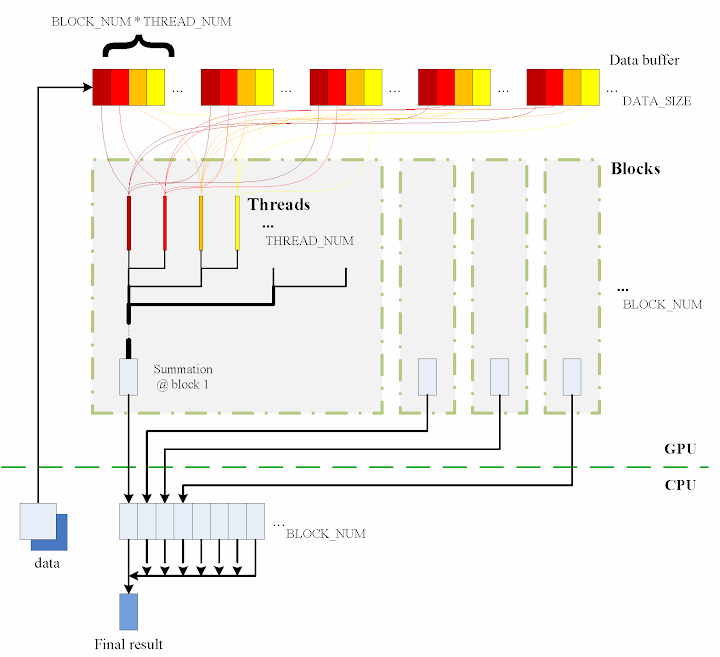

The consecutive steps are:

1. Copy data from the CPU memory to the GPU memory.

cudaMemcpy(gpudata, data, sizeof(int) * DATA_SIZE, cudaMemcpyHostToDevice);

2. Totally BLOCK_NUM blocks are used, and in each block THREAD_NUM threads are produced to perform the calculation. In practice, I used THREAD_NUM = 512, which is the greatest allowed thread number in a block of CUDA. Thereby, the raw data are seperated into DATA_SIZE / (BLOCK_NUM * THREAD_NUM) groups.

3. The access to the data buffer is designed as consecutive, otherwise the efficiency will be reduced.

4. Each thread does its corresponding calculation.

shared[tid] = 0;
for (int i = bid * THREAD_NUM + tid; i < DATA_SIZE; i += BLOCK_NUM * THREAD_NUM) {
    shared[tid] += num[i] * num[i];
}

5. By using shared memory in the blocks, sub summation can be done in each block. Also, the sub summation is parallelised to achieve as high execution speed as possible. Please refer to the source code regarding the details of this part.

6. The BLOCK_NUM sub summation results for all the blocks are copied back to the CPU side, and they are then added together to obtain the final value

cudaMemcpy(&sum, result, sizeof(int) * BLOCK_NUM, cudaMemcpyDeviceToHost);

int final_sum = 0;
for (int i = 0; i < BLOCK_NUM; i++) {
    final_sum += sum[i];
}

Regarding the procedure, function QueryPerformanceCounter records the code execution duration, which is then used for comparison between the different implementations. Before each call of QueryPerformanceCounter, CUDA function cudaThreadSynchronize() is called to make sure that all computations on the GPU are really finished. (Please refer to the CUDA Best Practices Guide §2.1.)

Algorithm in thrust

The application of the library thrust could make the CUDA code as simple as a plain C++ one. The usage of the library is also compatible with the usage of STL (Standard Template Library) of C++. For instance, the code for the calculation on GPU utilising thrust support is scratched like this:

thrust::host_vector<int> data(DATA_SIZE);
srand(time(NULL));
thrust::generate(data.begin(), data.end(), random());

cudaThreadSynchronize();
QueryPerformanceCounter(&elapsed_time_start);

thrust::device_vector<int> gpudata = data;

int final_sum = thrust::transform_reduce(gpudata.begin(), gpudata.end(),
    square<int>(), 0, thrust::plus<int>());

cudaThreadSynchronize();
QueryPerformanceCounter(&elapsed_time_end);
elapsed_time = (double)(elapsed_time_end.QuadPart - elapsed_time_start.QuadPart)
    / frequency.QuadPart;

printf("sum (on GPU): %d; time: %lf\n", final_sum, elapsed_time);

thrust::generate is used to generate the random data, for which the functor random is defined in advance. random was customised to generate a random integer ranged from 0 to 9.

// define functor for
// random number ranged in [0, 9]
class random
{
public:
    int operator() ()
    {
        return rand() % 10;
    }
};

In comparison with the random number generation without thrust, the code could however not be as elegant.

// generate random number ranged in [0, 9]
void GenerateNumbers(int * number, int size)
{
    srand(time(NULL));
    for (int i = 0; i < size; i++) {
        number[i] = rand() % 10;
    }
}

Similarly square is a transformation functor taking one argument. Please refer to the source code for its definition. square was defined for __host__ __device__ and thus it can be used for both the CPU and the GPU sides.

// define transformation f(x) -> x^2
template <typename T>
struct square
{
    __host__ __device__
        T operator() (T x)
    {
        return x * x;
    }
};

That is all for the thrust based code. Is it concise enough? :) Here function QueryPerformanceCounter also records the code duration. On the other hand, the host_vector data is operated on CPU to compare. Using the code below, the summation is performed by the CPU end:

QueryPerformanceCounter(&elapsed_time_start);

final_sum = thrust::transform_reduce(data.begin(), data.end(),
    square<int>(), 0, thrust::plus<int>());

QueryPerformanceCounter(&elapsed_time_end);
elapsed_time = (double)(elapsed_time_end.QuadPart - elapsed_time_start.QuadPart)
    / frequency.QuadPart;

printf("sum (on CPU): %d; time: %lf\n", final_sum, elapsed_time);

I also tested the performance if use thrust::host_vector<int> data as a plain array. This is supposed to cost more overhead, I thought, but we might be curious to know how much. The corresponding code is listed as

final_sum = 0;
for (int i = 0; i < DATA_SIZE; i++)
{
    final_sum += data[i] * data[i];
}

printf("sum (on CPU): %d; time: %lf\n", final_sum, elapsed_time);

The execution time was recorded to compare as well.

Test results on GPU & CPU

The previous experiences show that GPU surpasses CPU when massive parallel computation is realised. When DATA_SIZE increases, the potential of GPU calculation will be gradually released. This is predictable. Moreover, do we lose efficiency when we apply thrust? I guess so, since there is extra cost brought, but do we lose much? We have to judge from the comparison results.

When DATA_SIZE increases from 1 M to 32 M (1 M equals to 1 * 1024 * 1024), the results obtained are illustrated as the table
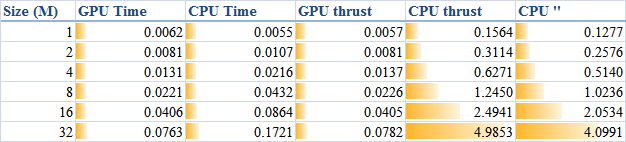

The descriptions of the items are:
  • GPU Time: execution time of the raw CUDA code;
  • CPU Time: execution time of the plain loop code running on the CPU;
  • GPU thrust: execution time of the CUDA code with thrust;
  • CPU thrust: execution time of the CPU code with thrust;
  • CPU '': execution time of the plain loop code based on thrust::
    host_vector
    .
The corresponding trends can be summarised as
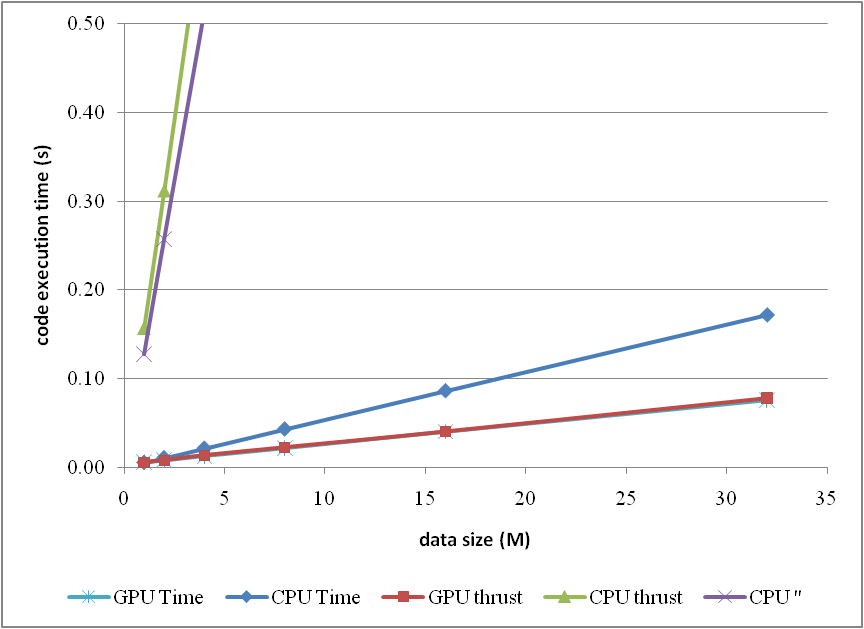

or compare them by the column figure
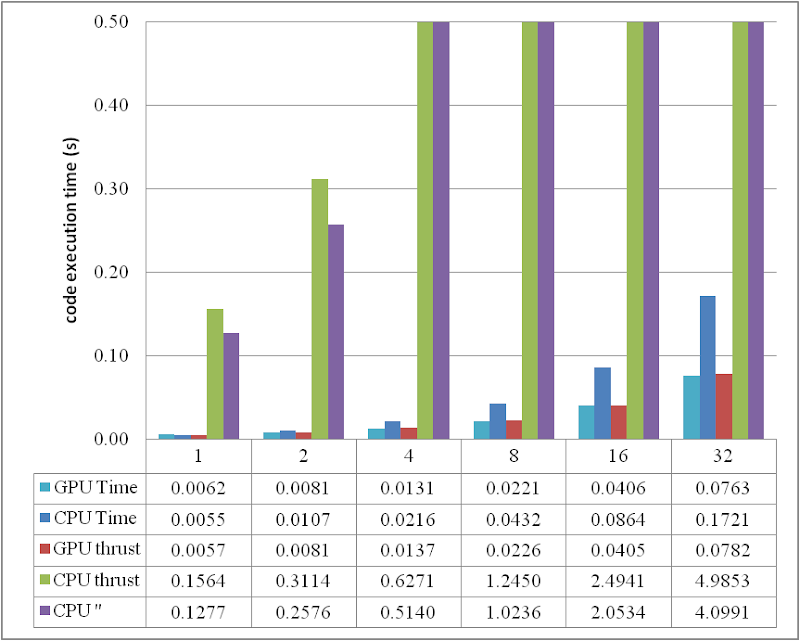

The speedup of GPU to CPU is obvious when DATA_SIZE is more than 4 M. Actually with greater data size, much better performance speedup can be obtained. Interestingly, in this region, the cost of using thrust is quite small, which can even be neglected. However, on the other hand, don't use thrust on the CPU side, neither thrust::transform_reduce method nor a plain loop on a thrust::host_vector; according to the figures, the cost brought is huge. Use a plain array and a loop instead.

From the comparison figure, we found that the application of thrust not only simplifies the code of CUDA computation, but also compensates the loss of efficiency when DATA_SIZE is relatively small. Therefore, it is strongly recommended.

Conclusion

Based on the tests performed, apparently, by employing parallelism, GPU shows greater potential than CPU does, especially for those calculations which contains much more parallel elements. This article also found that the application of thrust does not reduce the code execution efficiency on the GPU side, but brings dramatical negtive changes in the efficiency on the CPU side. Consequently, it is better using plain arrays for CPU calculations.

In conclusion, the usage of thrust feels pretty good, because it improves the code efficiency, and with employing thrust, the CUDA code can be so concise and rapidly developed.

ps - This post can also be referred from one of my articles published on CodeProject, "A brief test on the code efficiency of CUDA and thrust", which could be more complete and source code is attached as well. Any comments are sincerely welcome.

Additionally, the code was built and tested in Windows 7 32 bit plus Visual Studio 2008, CUDA 3.0 and the latest thrust 1.2. One also needs a NVIDIA graphic card as well as CUDA toolkit to run the programs. For instructions on installing CUDA, please refer to its official site CUDA Zone.