Monday, 2 August 2010

Apply CUDA to solve a 1D heat transfer problem

News - On 27th June, 2010 NVIDIA released CUDA 3.1 and on 21st July, released Parallel Nsight 1.0. The download sites for CUDA Toolkit 3.1 and NVIDIA Parallel Nsight 1.0 are here and here, respectively.

I recently wrote a small piece of code using CUDA to solve a 1D heat transfer problem. The heat transfer happens along the material whose properties are density ρ = 930 kg/m3, specific heat Cp = 1340 J/(kg K) and thermal conductivity k = 0.19 W/(m K). As shown in the figure below, the computation region is illustrated by the thick orange line; the total distance is 1.6 m. There are two boundary conditions attached: at the left end, the temperature is fixed to be 0 oC, while at the right end, a heat flux q = 10 W/m2 is imposed.


If the initial temperature for the entire region is 0 oC, I want to calculate the temperature distribution along the region after 10 seconds' heat propogation.

In the previous figure, the governing heat equation, in partial differential form, has been given. It is then discretised for the internal region, i.e. the orange line, and the right end boundary, which is redly circled, respectively. In the computation, I discretised the entire distance, 1.6 m, into 32768 elements - within CUDA, 64 blocks can be used to handle these elements. On the other hand, for the time marching iteration, the time step can be determined as


in which α is the thermal diffusivity.

The calculation results, with the help of CUDA and based on float operation, are depicted as


The temperature values for x < 1.5926 m are all zero; therefore they are neglected in the picture. In order to verify the results, the same calculation was also implemented onto CPU and even COMSOL software. The implementation on CPU gave
The interesting thing concerns us is the code efficiency. Once again, I used CUDA 3.1 on my GeForce 9800 GTX+ and a single core of the Q6600 CPU, and the time durations elapsed on the GPU and the CPU for the same calculation are 1.43 s and 5.04 s, respectively. The speedup is 3.52. This speedup value is not that attractive, but it is actually supposed to be much higher when there are much more discretised elements.

I also record the temperature development, in a transient process, of the right end boundary, at which there is heat flux injected. The 10 seconds development curve is illustrated as


I didn't find an easy way to paste source code onto the blog. If you are interested, please leave a comment and the related code can be shared in any way.

News - The source code can be found in the new post on porting this CUDA program onto Mac OS X.

Sunday, 11 July 2010

A brief test on the efficiency of a .NET 4.0 parallel code example - Part II

With respect to the article, "A Brief Test on the Efficiency of a .NET 4.0 Parallel Code Example", Daniel Grunwald proposed additional interesting pieces of code to compare. First of all, the LINQ and PLINQ methods are present as

// LINQ (running on single core)
final_sum = data.Sum(d => d * d);
// PLINQ (parallelised)
final_sum = data.AsParallel().Sum(d => d * d);

They are the most concise code to implement the computation. However, when the individual calculations are very cheap, for example, this simple multiplication d => d * d, the overhead of delegates and lambda expressions could be largely noticable.

When parallelising an algorithm, it is essential to avoid false sharing. In the previous article I split the raw data array into a group of pieces and compute the sub-summation for each piece. Actually I manually determine the number of the pieces - I did a sensitivity study and found that 16 k pieces are sufficient for a data size less than 32 M; larger data size might need more pieces.

Daniel reminded that, by using an advanced overload of Parallel.For, the work can be distributed into pieces by .NET. The code is as

// localSum
final_sum = 0;
Parallel.For(0, DATA_SIZE,
             () => 0, // initialization for each thread
             (i, s, localSum) => localSum + data[i] * data[i], // loop body
             localSum => Interlocked.Add(ref final_sum, localSum) // final action for each thread
            );

However this method didn't improve the efficiency as expected, at least not efficient as my manual method grouping the array into 16 k pieces, because of, we believe, the dramatic overhead caused by delegates relatively to the cheap multiply-add operation.

Then the working units can be combined to be slightly heavier to compensate the delegate overhead, for example, processing 1024 elements in each invocation.

// localSum & groups
final_sum = 0;
Parallel.For(0, (int)(DATA_SIZE / 1024),
             () => 0,
             (i, s, localSum) =>
             {
                 int end = (i + 1) * 1024;
                 for (int j = i * 1024; j < end; j++)
                 {
                     localSum += data[j] * data[j];
                 }
                 return localSum;
             },
             localSum => Interlocked.Add(ref final_sum, localSum)
            );

Finally, this piece of code becomes the most efficient one we have ever found.

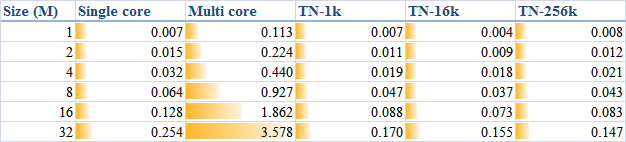
In order to generally look at the comparison between the methods, I, once again, list a table as


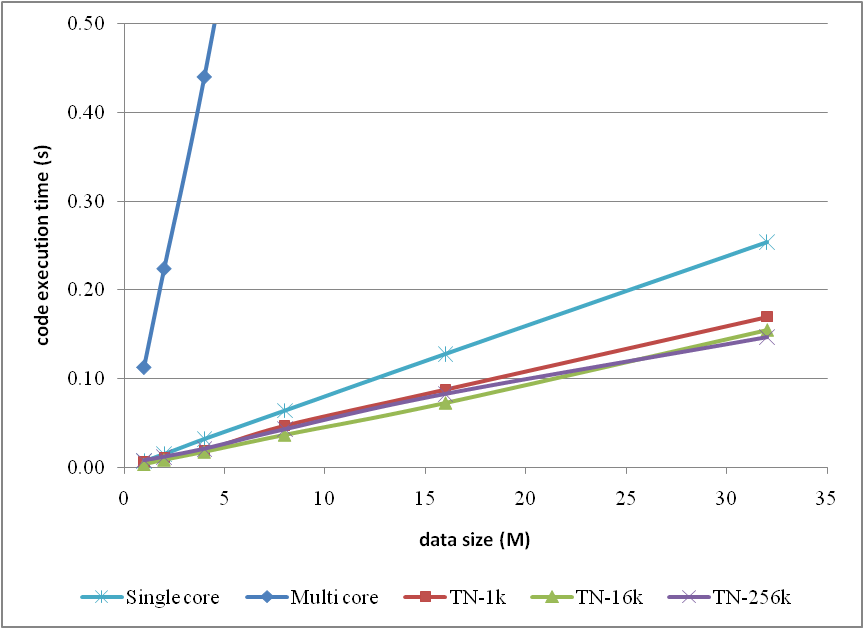
and the corresponding curves


Note that, in the comparison, I neglected the methods which have already been proved as inefficient in the previous article for clarity.

Any comments are welcome.

Friday, 2 July 2010

A brief test on the efficiency of a .NET 4.0 parallel code example

As a piece of accompanying work of the article, "A short test on the code efficiency of CUDA and thrust", I published a new parallel code example in C# 4.0 on CodeProject. The new example tests the new parallel programming support provided from .NET 4.0, and the corresponding article can be found as

A Brief Test on the Efficiency of a .NET 4.0 Parallel Code Example

Briefly the test results could be depicted by


and pictorially


however the original text is suggested to read for more details if you are interested.

I hope the work helps and your comments are welcome.

Monday, 28 June 2010

SALOME version 5.1.4 is released

In the good piece of news, CEA/DEN, EDF R&D and OPEN CASCADE are pleased to announce SALOME 5.1.4. It is a public maintenance release that contains the results of planned major and minor improvements and bug fixes against SALOME version 5.1.3 released in December 2009.

This new release of SALOME includes the following important new features and improvements:
  • Improved Filling algorithm in Geometry module.
  • Mesh scaling operation.
  • Split all 3d mesh elements (volumes) to the tetrahedrons.
  • Change sub-meshing order for the concurrent sub-meshes.
  • Find mesh element closest to the specified point.
  • Modify point markers in Mesh and Post-Pro modules.
  • Sort table data (Post-Pro module).
  • Using of two vertical axes in the Plot2d viewer.
  • Keyboard free interaction style in OCC viewer.
  • New features in YACS module.
  • And more … see SALOME 5.1.4 Release Notes for details

SALOME 5.1.4 supports Debian 4.0 Etch 32bit and 64bit; both are Ubuntu compatible. The latest installation wizard packages can be retrieved from the download page of the official site. As feedback from users, the tutorial "Installation of SALOME 5.1.3 on Ubuntu 10.04 (64 bit)" also works with SALOME 5.1.4 on Ubuntu 10.04.

We also look forward to the corresponding Windows version.

SALOME 5.1.4 for tests on windows available

As announced by Adam on 2nd July, 2010, SALOME version 5.1.4 for tests on windows is already available. Please refer to the download page and the how-to-compile page for more details.

Saturday, 26 June 2010

OpenFOAM 1.7.0 is released

A major, new release of version 1.7.0 of the OpenFOAM open source CFD toolbox is released. The new package can be downloaded from the official page. Version 1.7.0 is distributed: (1) as Debian packs created for Ubuntu 10.04 LTS; (2) as source code for compilation on other Linux systems. Please read the announcement, "OpenCFD release OpenFOAM® version 1.7.0", to know more.

The following introduction on the release of OpenFOAM 1.7.0 is borrowed from here.

OpenFOAM-1.7.0 is the latest release of OpenFOAM that contains new features both from OpenCFD’s development version of OpenFOAM and the repository 1.6.x distribution. This release passes our standard tests and the tutorials have been broadly checked. Please report any bugs by following the link: http://www.openfoam.com/bugs.

GNU/Linux version

This release of OpenFOAM is distributed primarily in 2 ways: (1) as a Debian pack containing binaries and source; (2) from a source code repository.

The Ubuntu/Debian pack is available for 32 and 64 bit versions of the 10.04 LTS operating system using the system compiler and libraries that will be installed automatically from standard Debian packs.

To use the source version, we provide a source pack of third-party packages that can be compiled on the user’s system. This does not include gcc, since the system installed version is typically sufficient, but includes paraview-3.8.0, openmpi-1.4.1, scotch_5.1, metis-5.0pre2, ParMetis-3.1 and ParMGridGen-1.0.

Library developments

There have been a number of developments to the libraries to support the extension of functionality in solver and utility applications.

Core library
  • Large number of code refinements and consistency improvements to support other developments.
Turbulence modelling
  • Wall function boundary conditions:
    • New mutWallFunction continuous wall function,
    • New mutLowReWallFunction continuous wall function,
    • New nutWallFunction continuous wall function,
    • New nutLowReWallFunction continuous wall function,
    • Standard wall functions, based on k, now renamed nutkWallFunction and mutkWallFunction,
    • omegaWallFunction now includes laminar blending function.
  • Conjugate heat transfer boundary conditions:
    • New turbulentTemperatureCoupledBaffleMixed BC,
    • New turbulentTemperatureCoupledBaffle BC.
Thermo-physical models

There has been a set of developments to redefine the thermodynamics in some solvers in terms of sensible enthalpy instead of total (i.e. including chemical) enthalpy. This was done to improve the handling of thermodynamics in the case of partially-premixed or non-premixed combustion systems, or to handle systems with non-unity Lewis number.
  • New hsPsiThermo thermophysical model calculation based on sensible enthalpy hs and compressibility psi.
  • New hsRhoThermo thermophysical model calculation based on hs and density rho.
  • New hsCombustionThermo thermophysical model calculation for a combustion mixture based on hs and psi.
  • New hsPsiMixtureThermo thermophysical model calculation for a mixture based on hs and psi.
  • New hsReactionThermo thermophysical model calculation for a complex reacting mixture based on hs.
DSMC
  • 1D and 2D planar simulations now possible by specifying empty patches in the usual way.
  • New MixedDiffuseSpecular wall boundary condition added.
  • New pressure field measurement.
  • New measurement of velocity slip and temperature jump.
Dynamic mesh
  • New sixDoFRigidBodyDisplacement six degree-of-freedom, fluid coupled rigid body motion, applied as a boundary condition to a patch in the pointDisplacement field for dynamic mesh cases. The motion may have any number of restraints (springs and dampers) and constraints (reductions in degrees-of-freedom) applied. Restraints include linearAxialAngularSpring, linearSpring, sphericalAngularSpring and tabulatedAxialAngularSpring. Constraints include fixedAxis, fixedLine, fixedOrientation, fixedPlane and fixedPoint.
Numerics
  • MULES now supports sub-cycling on moving meshes for interface capturing VoF (volume of fluid) calculations.
  • Developments to TimeActivatedExplicitSource, a class that allows a source to be applied to an equation according to an input dictionary at run-time, that can be switched on at particular times and within particular regions of the mesh, using cellZones.

Solvers

A number of new solvers have been developed for a range of engineering applications. There has been a set of improvements to certain classes of solver that are introduced in this release.

New solvers
  • fireFoam: Transient solver for fires and turbulent diffusion flames.
  • rhoPorousMRFPimpleFoam: Transient solver for laminar or turbulent flow of compressible fluids with support for porous media and MRF for HVAC and similar applications. Uses the flexible PIMPLE (PISO-SIMPLE) solution for time-resolved and pseudo-transient simulations.
  • chtMultiRegionSimpleFoam: Steady-state version of chtMultiRegionFoam.
  • porousSimpleFoam: Steady-state solver for incompressible, turbulent flow with implicit or explicit porosity treatment.
  • interMixingFoam: Solver for 3 incompressible fluids, two of which are miscible, using a VoF method to capture the interface.
  • porousInterFoam: Solver for 2 incompressible, isothermal immiscible fluids using a VoF phase-fraction based interface capturing approach.
  • simpleWindFoam: Steady-state solver for incompressible, turbulent flow with external source in the momentum equation to approximate, e.g. wind turbines; located in tutorials, with associated turbineSiting test case.
Modifications to multiphase and buoyant solvers
  • Multiphase and buoyant flow solvers now solve for p = p - ρg ∙ x, rather than the static pressure p. This change is to avoid deficiencies in the handling of the pressure force / buoyant force balance on non-orthogonal and distorted meshes.
  • Improvements to boundary conditions and pressure referencing in closed domains have been developed to avoid the problems encountered in previous attempts to decompose pressure for buoyant flow.
  • The following solvers have been modified for p_rgh: fireFoam buoyantBoussinesqPimpleFoam, buoyantBoussinesqSimpleFoam, buoyantPimpleFoam, buoyantSimpleFoam, chtMultiRegionFoam, chtMultiRegionSimpleFoam, compressibleInterDyMFoam, compressibleInterFoam, interDyMFoam, porousInterFoam, MRFInterFoam, interFoam, interPhaseChangeFoam, multiphaseInterFoam, settlingFoam, twoLiquidMixingFoam.
Modifications to solvers for sensible enthalpy
  • The following solvers have been modified to solve for hs (instead of h): dieselEngineFoam, dieselFoam, reactingFoam, rhoReactingFoam, coalChemistryFoam, porousExplictSourceReactingParcelFoam, reactingParcelFoam.
Modifications to steady-state compressible solvers
  • Boundedness to the thermodynamics is ensured by limiting the density, rather than the pressure. This improves convergence by maintaining consistency between the pressure gradient and momentum changes.
  • Removed the Sp “boundedness” correction in the convection term from the momentum equation.
  • The following solvers have been modified with this change: rhoSimpleFoam, buoyantSimpleFoam, chtMultiRegionSimpleFoam.
Other modifications
  • Added diffusion number limit to the time-step correction in chtMultiRegionFoam.
  • Reformulated pressure correction during phase change to maintain boundedness of pressure in cavitatingFoam.

Boundary conditions

New boundary conditions have been introduced to support new applications in OpenFOAM.
  • Added new time varying boundary conditions.
  • Added new velocity inlets and wall boundary conditions: cylindricalInletVelocity, swirlFlowRateInletVelocity, translatingWallVelocity.
  • Added boundary conditions for wind/atmospheric simulation: atmBoundaryLayerInletEpsilon, atmBoundaryLayerInletVelocity, fixedShearStress.

Utilities

There have been some utilities added and updated in this release.

New utilities
  • foamToTecplot360: Tecplot binary file format writer.
  • IFCLookUpTableGen: Infinitely-fast chemistry (IFC) look-up table generator that calculates the infinitely-fast chemistry relationships as a function of ft for a given fuel.
Updated utilities
  • gmshToFoam: adapted for msh2.1 and 2.2 format.
  • snappyHexMesh: lower memory usage by pre-balancing and non-blocking transfers.
  • blockMesh: proper spline edges.
  • setSet: handling of faceZoneSet, cellZoneSet, pointZoneSet.
  • splitMeshRegions: option to use existing cellZones only for split.
  • changeDictionary: allow wildcards in changeDictionaryDict.

Post-processing

Post-processing has been extended particularly to function objects, the on-the-fly post-processing system.
  • New fieldValues function object, allows spatial averaging, sum, min/max calculations to be made on fields in sets of cells or faces in the geometry
  • New surfaceInterpolateFields function object to generate surface fields from volume fields where required
  • New sampledTriSurfaceMesh surface type for surface sampling function object
  • New readFields function object controls the loading of fields from time directories for further post-processing

New tutorials

There is a large number of new tutorials to support the new solvers in the release.
  • combustion/fireFoam/les/smallPoolFire2D
  • combustion/reactingFoam/ras/counterFlowFlame2D
  • compressible/rhoPorousMRFPimpleFoam/mixerVessel2D
  • heatTransfer/chtMultiRegionSimpleFoam/multiRegionHeater
  • incompressible/pimpleDyMFoam/wingMotion
  • incompressible/porousSimpleFoam/angledDuctExplicit
  • incompressible/porousSimpleFoam/angledDuctImplicit
  • incompressible/simpleWindFoam/turbineSiting
  • lagrangian/porousExplictSourceReactingParcelFoam/parcelInbox
  • lagrangian/porousExplictSourceReactingParcelFoam/verticalChannel
  • multiPhase/interDyMFoam/floatingObject
  • multiPhase/interMixingFoam/laminar/damBreak
  • multiPhase/interPhaseChangeFoam/cavitatingBullet

Saturday, 19 June 2010

Installation of Code_Saturne 2.0-rc1 on Ubuntu 10.04 (64 bit)

Based on the previous posts, "Installation of Code_Saturne 2.0.0 on Ubuntu 9.04" and "Installation of Code_Saturne 2.0-rc1 on Ubuntu 9.10", and David's comments, I double checked the installation of Code_Saturne onto Ubuntu 10.04 LTS (long-time support version) and record the procedure here.

1. Install prerequisites

Using apt-get install the packages as

:/$ sudo apt-get install build-essential gfortran libxml2 libxml2-dev libatlas-headers libatlas-base-dev openmpi-bin openmpi-dev libibverbs-dev openssh-server python-qt4 pyqt4-dev-tools swig python-dev

2. Install HDF5 and MED libraries

Thanks to David's help, I used apt-get to install the 2 packages

:/$ sudo apt-get install libhdf5-serial-dev libmedc-dev

On Ubuntu 10.04, this installs HDF5 1.8.4 and MED 2.3.5. What Code_Saturne really needs is a MED 2.3 mesh format, and thus the minimum version of MED required must be 2.3.0.

I am also glad to see that Code_Saturne supports to use HDF5 1.8.x now.

3. Compile METIS

Download a patched version of Metis-4.0 from my link, and extract it. Compile as

# ship into metis-4.0
:/$ make
:/$ sudo cp graphchk kmetis mesh2dual mesh2nodal oemetis onmetis partdmesh partnmesh pmetis /usr/local/bin/
:/$ sudo cp libmetis.a /usr/local/lib/
:/$ sudo cp Lib/*.h /usr/local/include/

Indeed, it is annoying to install METIS due to prototypes redefinition, non-standard directories installation, ... which probably make you don't want to use METIS, even though my patched version. As suggested, you can use the SCOTCH library instead (perhaps a bit less performant for many-processors calculation, but sufficient for standard ones), or only use the internal partioner of Code_Saturne (based on a Space-Filling Curve algorithm, which is good-enough for few-processors calculation, e.g. several-core but mono-processor computers).

4. Configure and compile bft, fvm, ecs and mei sequentially

# ship into bft-1.1.2
:/$ ./configure
:/$ make
:/$ sudo make install

# ship into fvm-0.15.0
:/$ ./configure --with-mpi=/usr/lib/openmpi
...
Configuration options:
 use debugging code: false
 MPI (Message Passing Interface) support: yes
   MPI I/O support: yes
   MPI2 one-sided communication support: yes
 HDF (Hierarchical Data Format) support: yes
 CGNS (CFD General Notation System) support: no
 MED (Model for Exchange of Data) support: yes
...
:/$ make
:/$ sudo make install

# ship into ecs-2.0.0-rc1
:/$ ./configure
...
Configuration options:
 use debugging code: false
 use long integers: false
 ADF support: no
 CCM support: no
 HDF5 (Hierarchical Data Format) support: yes
 CGNS (CFD General Notation System) support: no
 MED (Model for Exchange of Data) support: yes
 METIS (Graph Partitioning) support: yes
 SCOTCH (Graph Partitioning) support: no
...
:/$ make
:/$ sudo make install

MEI is not compulsory, but strongly recommended, as long as you want to define function expressions handily in the GUI.

# ship into mei-1.0.1
:/$ ./configure --with-bft=/usr/local
...
Configuration options:
 use debugging code: false
 Python bindings: true
...
:/$ make
:/$ sudo make install

5. Patch and compile ncs

Extract the patch patches-portability-ncs-20rc1.tgz to the ncs directory.

# ship into ncs-2.0.0-rc1
:/$ tar xzvf ../patch/patches-portability-ncs-20rc1.tgz

Extract the patch rho_mu-tar.gz to a directory. There are 2 files contained, cs_gui.c and FluidCharacteristicsView.py, and copy them accordingly.

# in ncs-2.0.0-rc1
:/$ find . -name cs_gui.c
./src/base/cs_gui.c
:/$ cp ../patch/rho_mu/cs_gui.c src/base/
:/$ find . -name FluidCharacteristicsView.py
./gui/Pages/FluidCharacteristicsView.py
:/$ cp ../patch/rho_mu/FluidCharacteristicsView.py gui/Pages/

Configure and compile ncs, as

# in ncs-2.0.0-rc1
:/$ ./configure --with-mpi=/usr/lib/openmpi --with-prepro=/usr/local --with-mei=/usr/local
...
Configuration options:
 use debugging code: false
 use graphical user interface: yes
 MPI (Message Passing Interface) support: yes
 OpenMP support: no
 BLAS (Basic Linear Algebra Subprograms) support: yes
 Libxml2 (XML Reader) support: yes
 MEI (Mathematical Expressions Interpreter) support: yes
 SYRTHES 3 coupling support: no
 IP socket support (for SYRTHES 3 or CFD_Proxy): yes
 Dynamic loader support (for YACS): yes
...
:/$ make
:/$ sudo make install

6. (optional) Compile latex documents

If you don't use latex, you don't have to bother to compile the documents. I already prepared my compiled documents (pdf files) for you to use directly.

If you want to do it manually, please follow

# for processing LaTeX documents
:/$ sudo apt-get install tetex-bin tetex-base transfig
# in ncs-2.0.0-rc1
:/S cp ~/fullpage.sty ~/lastpage.sty doc/style/
:/$ make pdf
:/$ sudo make install-pdf

7. Run Code_Saturne

After finished the procedure without rebooting the system, I tried to run Code_Saturne but encountered an error as

  ********************************************
    Starting calculation
  ********************************************

Error running the preprocessor.
Check preprocessor log (listpre) for details.

Error running the partitioner.
Check partitioner log (listpart) for details.

  ********************************************
    Error in partitioning stage.
  ********************************************

In listpart it was written that

/usr/local/bin/cs_partition: error while loading shared libraries: libbft.so.1: cannot open shared object file: No such file or directory

Don't worry. Update the dynamic library database to avoid it.

:/$ sudo ldconfig
[sudo] password for salad:
:/$ sudo updatedb